2026-08-05
Remote Work in 2026: Build the Workflow, Not Just the Meeting Stack

Remote work does not usually fail because people are lazy, distracted, or missing office energy. It fails because the team never designed the operating system around how work moves.
A designer shares a mockup, a developer asks for context, a founder replies in a chat thread, a decision happens on a call, and the final state lives nowhere. Two days later, the same question comes back. The team adds another meeting and calls it alignment.
Teams think the problem is remote work. The real problem is unmanaged state across tools, conversations, decisions, and execution surfaces.
That changes the conversation. The practical question is not whether remote work is good or bad in 2026. The practical question is whether your team has a workflow that makes context easy to find, live collaboration easy to start, ownership clear, and decisions durable after the call ends.
Table of contents
- Remote work fails when the workflow is implicit
- The remote work stack in 2026
- Synchronous work vs asynchronous work
- Screen sharing is an operating layer for remote work
- A practical remote work workflow for design and code
- Implementation rules for remote teams
- What breaks in practice
- What works and what fails
- Metrics for healthy remote work
- Product fit: where PairUX belongs
- Make remote work a system, not a habit
Remote work fails when the workflow is implicit
Remote work exposes workflow gaps that an office used to hide. In an office, people patched missing context by tapping someone on the shoulder, overhearing a conversation, or walking to a desk. Those habits were inefficient, but they created a backup channel.
In a distributed team, that backup channel disappears. If the workflow is not explicit, every handoff becomes a guessing exercise. The person doing the work has to reconstruct intent from tickets, chat messages, calendar invites, design files, recordings, and memory.
The symptom is not fewer meetings
Many teams diagnose the problem as not enough face time. So they add standups, syncs, check-ins, design reviews, backlog grooming, pairing calls, and office hours. Some of those are useful. Most become compensating controls for unclear work.
The mistake teams make is treating a meeting as the unit of remote work. A meeting is only a temporary synchronization point. It is not a system of record. It does not automatically preserve decisions, ownership, or next actions.
If the same topic appears in three meetings, the issue is rarely attendance. The issue is that the decision did not land anywhere operational.
Practical rule: A remote meeting is successful only if the work state is clearer after the meeting than before it.
The architecture view
A useful way to think about it is that remote work has four layers:
- Context: what problem are we solving and why now.
- Execution: where people actually inspect, edit, test, design, debug, or review.
- Decision: what changed, who approved it, and what is blocked.
- Handoff: what another person can pick up without asking for a live explanation.
If any layer is missing, the team pays for it later. Designers wait for product clarification. Developers rework implementation details. Operators answer the same support question twice. Founders spend time being routers instead of decision makers.
The remote work stack in 2026
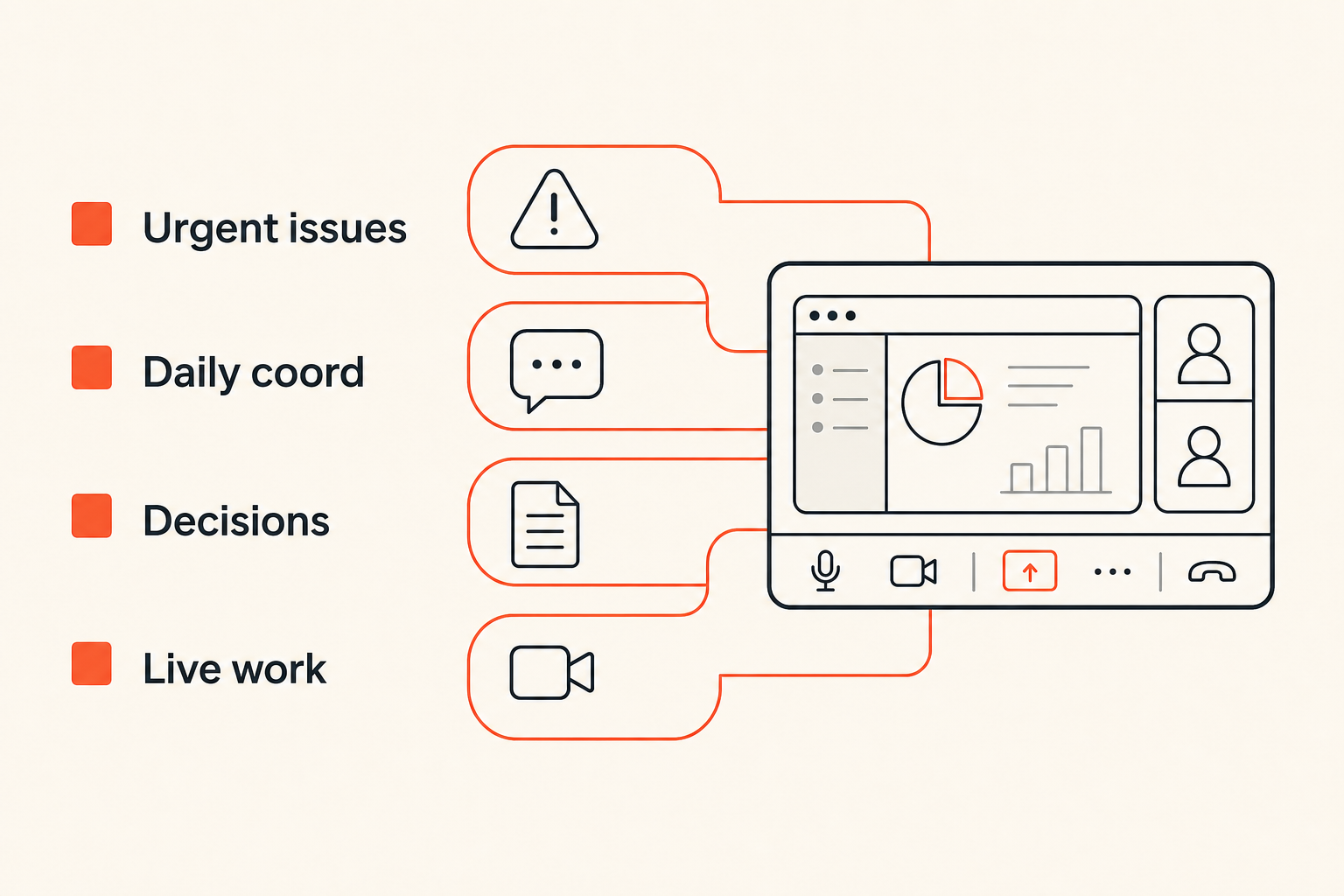
The remote work stack is not one app. It is a set of lanes. Each lane should have a clear purpose, otherwise every tool becomes a dumping ground.
The practical question is not which tools are popular. The practical question is which tool owns which type of state.
Communication lanes
Most remote teams need at least four communication lanes:
- Urgent operational issues: incidents, customer escalations, release blockers.
- Daily coordination: lightweight updates, quick asks, availability notes.
- Durable decisions: specs, tickets, design comments, architecture notes.
- Live collaboration: calls, screen sharing, remote control, pairing, walkthroughs.
The failure mode is using chat for all four. Chat is fast, but it is a weak system of record. It is easy to search poorly, easy to miss, and easy to interpret differently after the fact.
Video calls have a similar limitation. A call can compress a hard conversation into twenty minutes, but the outcome still needs a durable place to live. For teams comparing video-heavy workflows, our prior guide on Zoom video chat for remote teams covers where video helps and where it becomes meeting theater.
Related reading from our network: teams building live media products face a similar architecture problem, because streaming SaaS architecture is also about latency, state, delivery, and reliability rather than just a play button.
Collaboration surfaces
A collaboration surface is where the work is visible and changeable. That might be a Figma file, IDE, terminal, browser, staging app, analytics dashboard, customer account, or internal admin panel.
Remote work improves when the team can move from discussion to shared execution without forcing everyone to describe what they see. Screen sharing matters because it collapses interpretation time. Remote control matters because it lets the right person act while everyone else sees the same state.
The stack should answer these questions:
- Where do we discuss the problem.
- Where do we inspect the work.
- Where do we change the work.
- Where do we record the decision.
- Where does the next person continue.
If your tools cannot answer those questions, the team will create shadow workflows.
Synchronous work vs asynchronous work
Async is not a religion. Live collaboration is not a failure. The best remote teams use both deliberately.
The mistake teams make is pushing everything async to look efficient, then using emergency calls to repair confusion. The opposite mistake is making every decision live, which punishes deep work and time zones.
When to be live
Use synchronous work when the cost of misunderstanding is high or the work depends on fast shared perception.
Good live sessions include:
- Debugging an issue where logs, UI, and assumptions need to be inspected together.
- Design critique where cursor position, spacing, interaction state, and tradeoffs matter.
- Onboarding where a new teammate needs to see the actual workflow, not just documentation.
- Customer support escalation where the operator needs another person to drive or verify.
- Architecture review where the team must converge on constraints quickly.
Live work is expensive, but it is often cheaper than a week of async churn.
Practical rule: Go live when shared perception reduces more cost than the meeting creates.
When to stay async
Async works best when the work can be understood from artifacts. A well-written spec, recorded walkthrough, annotated screenshot, or pull request description should not require a meeting.
Async is the right default for:
- Status updates.
- Simple approvals.
- Non-urgent questions.
- Pre-read material.
- Decision logs.
- Follow-up actions.
What breaks in practice is pretending async means low effort. Good async work requires more clarity up front. The writer has to explain context, constraints, alternatives, and requested action. Lazy async creates hidden synchronous debt.
Screen sharing is an operating layer for remote work
Screen sharing is often treated as a feature inside a meeting tool. For serious remote work, it is closer to an operating layer.
The reason is simple: most knowledge work happens inside interfaces. Design review happens in design tools. Debugging happens in terminals, browsers, logs, IDEs, and dashboards. Product review happens inside builds and prototypes. Support happens inside user accounts and admin panels.
View-only is not enough
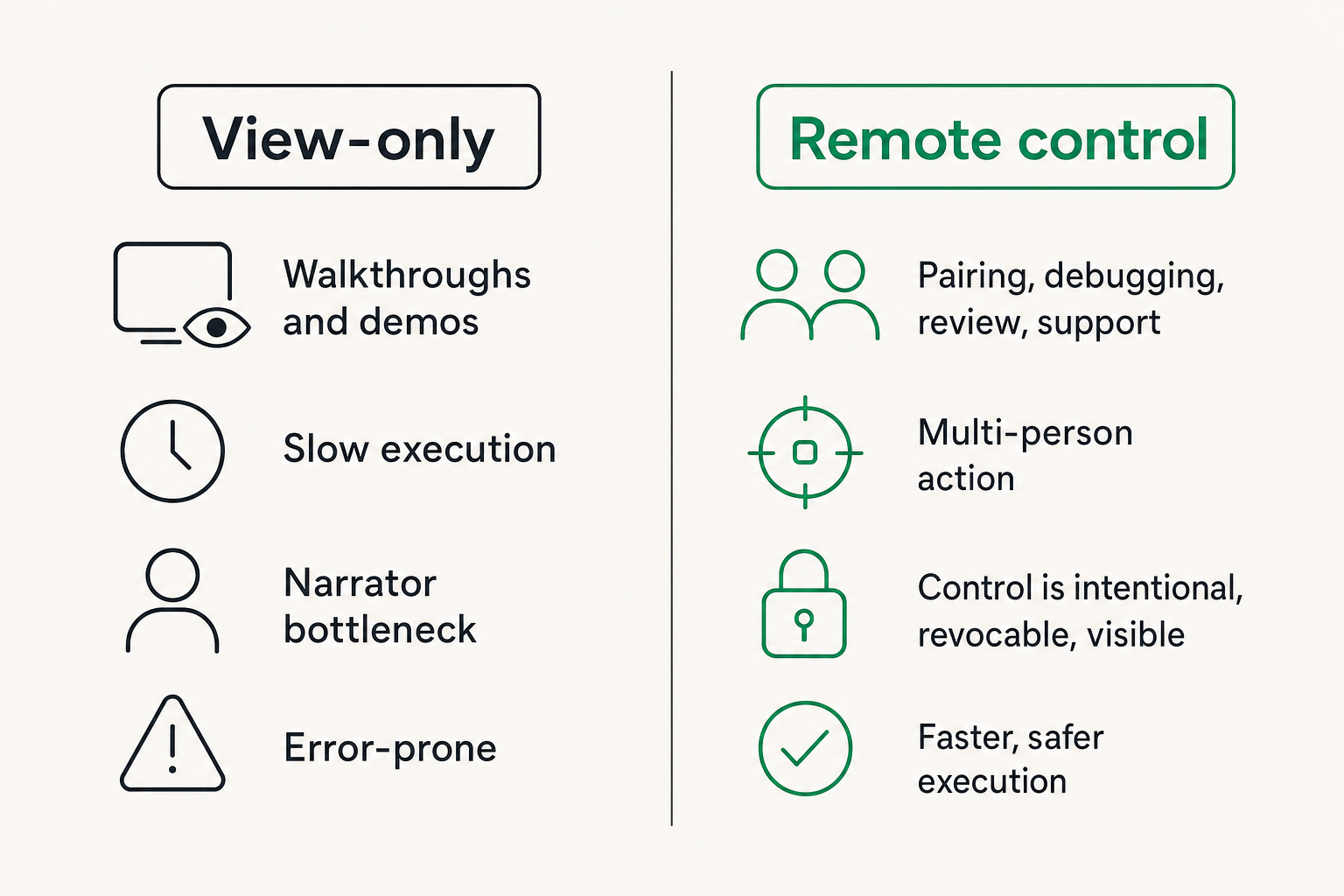
View-only screen sharing is useful for presentation. It is weaker for execution.
If one person has to narrate every click while another person tells them what to do, the session becomes slow and error-prone. The driver becomes a human API. The navigator has context but no control. Everyone waits for translation.
Remote work gets better when the collaboration surface supports multi-person action. That does not mean everyone should control everything all the time. It means control should be intentional, revocable, and visible.
A comparison helps:
| Collaboration mode | Best for | What fails |
|---|---|---|
| Chat only | Simple questions and updates | Missing visual context |
| Video only | Relationship and discussion | Decisions drift away from the work |
| View-only screen share | Walkthroughs and demos | Slow execution, narrator bottleneck |
| Screen share with remote control | Pairing, debugging, review, support | Needs clear permission and trust rules |
Remote control changes ownership
Remote control changes the session from show-and-tell to shared execution. The person with the best context can drive. The person with the right environment can host. The team can inspect the same state, act on it, and agree on the result.
That changes the conversation. A product designer can adjust spacing while a developer checks implementation constraints. A senior engineer can take control to inspect a failing test without asking the junior engineer to type every command. A founder can walk through a customer-facing bug with support and engineering looking at the same account.
The key is permission design. Remote control should be easy to grant, obvious when active, and easy to stop. If people feel like control is ambiguous, they will avoid using it.
A practical remote work workflow for design and code
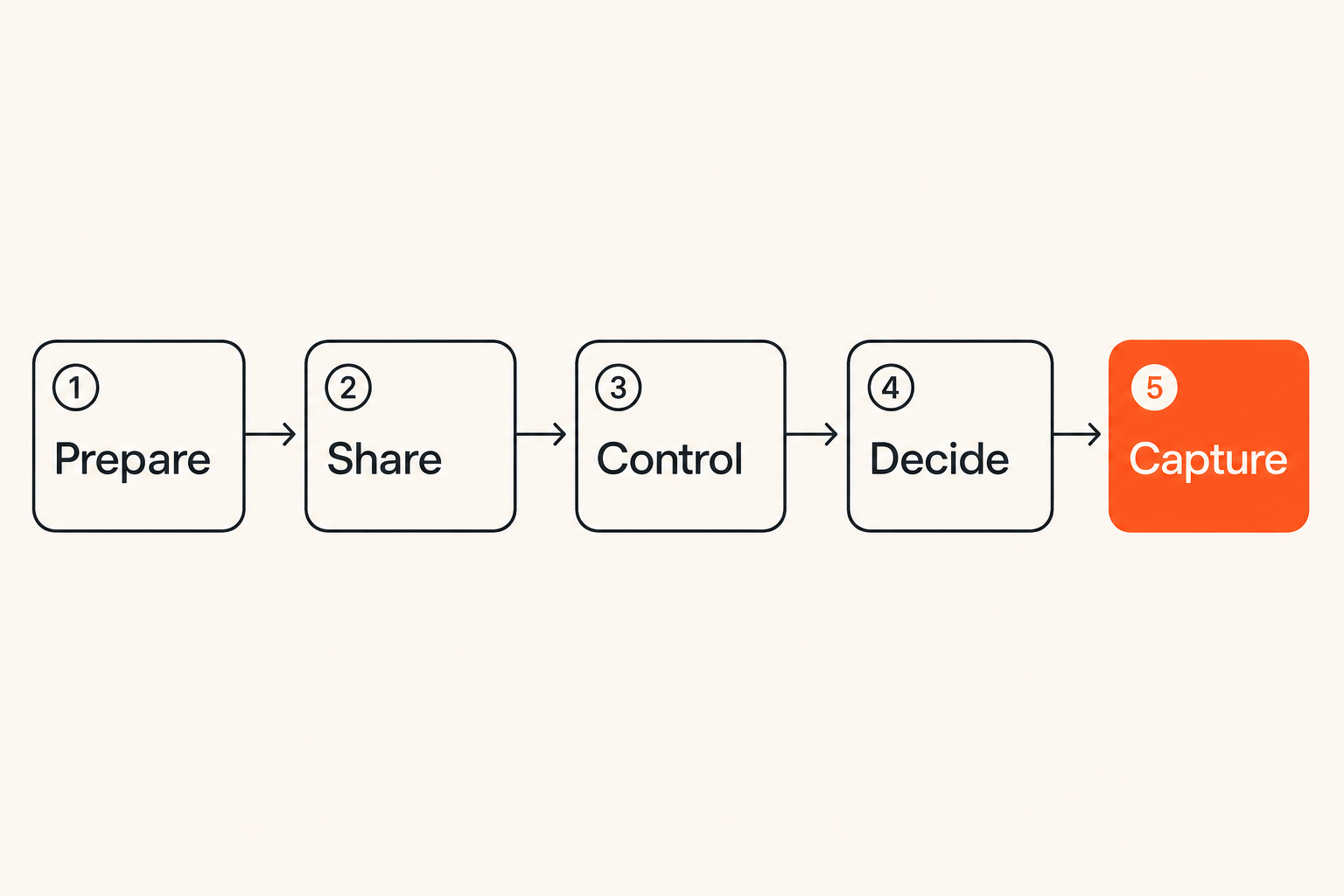
Remote work gets easier when the team has a repeatable sequence for high-value collaboration. The sequence does not need to be heavy. It just needs to reduce ambiguity before, during, and after the live session.
Here is a practical workflow for product designers, software developers, and startup operators.
Prepare context before the call
Before a live session, the owner should prepare enough context that the first ten minutes are not spent reconstructing the problem.
Use this minimum packet:
- Problem statement: what is broken, unclear, or being decided.
- Current artifact: link to design, branch, issue, build, dashboard, or customer example.
- Desired output: decision, fix, review, diagnosis, or handoff.
- Constraints: time, platform, release, customer, security, or dependency limits.
- Roles: who hosts, who drives, who decides, who documents.
This does not need to be a long document. Five bullets in the ticket or calendar invite are enough. The point is to enter the session with a target.
Pair, decide, and capture state
During the session, keep the team close to the work. If the artifact is a UI, share the UI. If the artifact is code, share the IDE or terminal. If the artifact is customer behavior, share the dashboard or admin view.
A simple live workflow looks like this:
- Host the environment where the work can be inspected.
- Share the screen and confirm everyone sees the same state.
- Grant remote control to the person best positioned to act.
- Make the smallest useful change or diagnosis.
- Record the decision and next action in the system of record.
- End the session when ownership is clear.
Practical rule: Do not leave a live collaboration session with the decision trapped in the recording.
Recordings can help, but they are not the primary artifact. Nobody wants to scrub through a forty-minute video to find a two-minute decision. Capture the decision where work continues.
Implementation rules for remote teams
The tooling details matter. Remote collaboration touches identity, permissions, performance, devices, networks, and security expectations. If the implementation feels unreliable or unsafe, teams route around it.
The mistake teams make is evaluating remote work tools only in a perfect demo environment. Production is messier. Someone is on hotel Wi-Fi. Someone uses Linux. Someone has a high-resolution monitor. Someone is pairing from a locked-down work laptop. Someone needs to review a customer issue without exposing unrelated data.
Access, identity, and permissions
Access rules should be boring and explicit. The team needs to know who can join, who can view, who can control, and who can invite others.
A workable setup includes:
- Named participants, not mystery guests.
- Visible control state, so everyone knows who is driving.
- Host-side ability to revoke control immediately.
- Clear session boundaries, so access does not linger after the work ends.
- Written rules for sensitive systems, customer data, and production tools.
This is also where documentation matters. If your team is rolling out a new collaboration tool, put the setup steps, system requirements, and security expectations where people can actually find them. PairUX keeps those operational details in the PairUX docs, which is the right pattern for any tool that becomes part of day-to-day work.
Related reading from our network: for engineering teams, the same behavior-first mindset shows up in security awareness training for CI/CD and software supply chain teams, where the goal is not a checkbox but safer habits inside the actual workflow.
Latency, devices, and fallbacks
Latency is not just a technical metric. It changes behavior. If cursor movement lags, people stop pairing and go back to narration. If audio breaks, decisions drift. If remote control is unreliable, the host becomes the bottleneck again.
Plan for fallbacks:
- If remote control fails, switch to annotated walkthrough.
- If audio fails, move voice to a separate call.
- If screen resolution is unreadable, zoom the shared workspace.
- If permissions block access, use a staging account or sanitized environment.
- If the session is too slow, split diagnosis and execution into separate steps.
Remote work does not need perfect conditions. It needs predictable failure handling.
What breaks in practice
Bad remote work systems fail in recognizable ways. The details vary, but the pattern is usually the same: too much conversation, not enough state.
Meeting sprawl
Meeting sprawl happens when a team uses calendar time to compensate for unclear ownership. Every project gets a sync. Every sync creates follow-ups. Follow-ups create another sync. Eventually the calendar becomes the project management system.
Symptoms include:
- People attend meetings just in case.
- Decisions are repeated because the owner was not in the room.
- Async updates are read aloud.
- Work waits for the next meeting even when the next action is obvious.
- The team feels busy but throughput does not improve.
The fix is not simply fewer meetings. The fix is better meeting contracts. Every recurring meeting should have an owner, decision scope, input artifact, and output artifact. If it has none, remove it.
Tool silos and lost decisions
Tool silos are more subtle. A decision starts in chat, gets debated in a call, changes in a design file, gets partially implemented in a pull request, and then reappears as a support issue.
Nobody is malicious. The system just has no clear state transition.
What breaks in practice is the handoff. The next person cannot tell whether a comment was a suggestion, decision, concern, or outdated thought. So they ask. The original decision maker responds. The cycle repeats.
To reduce this, define where each decision type lives:
- Product decisions live in product specs or issue trackers.
- Design decisions live in design files plus linked tickets.
- Engineering decisions live in architecture notes, pull requests, or ADRs.
- Customer decisions live in CRM, support tooling, or account notes.
- Operational decisions live in runbooks or incident records.
The tool matters less than the rule. One decision, one durable home.
What works and what fails
Remote work is full of advice that sounds reasonable and fails under load. The useful test is whether the practice still works when the team is busy, tired, distributed, and shipping.
What works
These practices hold up in production:
- Default to written context before live sessions.
- Use live collaboration for ambiguous, visual, or high-risk work.
- Keep decisions close to the artifact they affect.
- Use screen sharing when perception matters.
- Use remote control when the person with context should act directly.
- End meetings with owners and next actions, not vibes.
- Maintain a simple operating guide for collaboration norms.
Remote work also improves when the team has fewer, better rituals. A weekly product review with strong artifacts beats five scattered calls. A focused pairing session beats a long thread where everyone interprets screenshots differently.
What fails
These patterns usually fail:
- Treating chat as the permanent source of truth.
- Recording every meeting but summarizing none of them.
- Running async processes with unclear response expectations.
- Letting anyone book live sessions without input artifacts.
- Using screen sharing only for presentations, never execution.
- Granting remote control without visible permission boundaries.
- Measuring remote work by activity instead of throughput and decision quality.
Related reading from our network: independent operators face a related channel problem, and this guide on whether freelance websites are worth it in 2026 is useful because it frames platforms as part of a broader operating stack rather than the whole business.
Metrics for healthy remote work
You do not need a dashboard for every behavior. But you do need a way to see whether the workflow is improving or just getting louder.
The practical question is whether remote work is reducing coordination cost while preserving quality.
Lead time, wait time, and handoff cost
Start with simple operational signals:
- How long does a ticket wait for clarification.
- How often does work bounce between design, product, and engineering.
- How many meetings are needed before a decision is made.
- How often do pull requests stall due to missing context.
- How many customer issues require internal back-and-forth before resolution.
These are not vanity metrics. They show where state gets stuck.
If a ticket waits two days for a ten-minute clarification, the issue is not remote culture. The issue is that the workflow has no fast path for shared inspection and decision making.
Quality of decisions
Decision quality is harder to measure, but teams can still inspect it.
Look for:
- Decisions that remain stable after implementation begins.
- Fewer repeated debates.
- Clearer ownership after reviews.
- Fewer surprises at release time.
- Better onboarding because context is captured.
A healthy remote team does not avoid disagreement. It makes disagreement visible early, resolves it near the work, and records the outcome.
Practical rule: Measure remote work by how quickly the right people can understand, change, and hand off the work.
Product fit: where PairUX belongs
PairUX fits into the live collaboration layer of remote work. It is not trying to replace your issue tracker, design tool, repository, chat, or documentation system. That would be the wrong architecture.
The job is narrower and more useful: make shared screen work faster, more interactive, and easier to operate when people need to collaborate in real time.
PairUX as the shared execution surface
For remote teams, the valuable moment is often when discussion becomes action. Someone needs to inspect a UI, drive a browser, reproduce a bug, adjust a design, review an implementation, or guide another person through a workflow.
That is where collaborative screen sharing and remote control matter. PairUX gives teams a way to work together on the same visible surface instead of translating every action through narration. The PairUX features page is useful if you want to map specific capabilities like real-time screen sharing, remote control, multi-cursor collaboration, and cross-platform support to your team workflow.
Use PairUX for sessions where shared perception and shared control shorten the path to a decision or fix. That includes design review, developer pairing, QA walkthroughs, onboarding, customer support escalation, and founder-operator debugging.
Boundaries PairUX should not own
A good collaboration tool should have clear boundaries.
PairUX should not be your source of truth for product decisions. It should not replace the ticket. It should not become your documentation system. It should not be the only place a decision exists.
The clean pattern is:
- Use PairUX to see and act together.
- Use your work system to capture the decision.
- Use your async tools to communicate follow-up.
- Use documentation to preserve repeatable knowledge.
That separation keeps the workflow sane. Live collaboration accelerates understanding. Durable systems preserve the outcome.
Make remote work a system, not a habit
Remote work is not solved by buying a meeting tool, writing a culture memo, or declaring async-first. Those might help, but they are not the system.
The system is how work moves from problem to context, from context to shared execution, from shared execution to decision, and from decision to handoff.
Operating checklist for next week
If you want to improve remote work quickly, do this next week:
- Audit recurring meetings and remove any without a clear output artifact.
- Pick one system of record for each decision type.
- Require a five-bullet context packet before live collaboration sessions.
- Use screen sharing for visual or ambiguous work earlier, not later.
- Use remote control when the navigator should become the driver.
- End every session with owner, decision, next action, and location of record.
- Review one stalled project and identify where state got lost.
This is not heavy process. It is workflow hygiene. The teams that get remote work right are not the teams with the most tools. They are the teams that make state visible and handoffs cheap.
Try pairux.com
pairux.com gives remote teams fast, practical collaborative screen sharing with remote control for working together online. If your remote work breaks when discussion needs to become action, Try pairux.com.