2026-06-08
Cloud Based Productivity and Collaboration Tools: The Remote Team Architecture That Actually Works

Remote teams usually do not fail because they picked the wrong chat app. They fail because the work gets split across too many places, with no clear state, no ownership, and no reliable way to move from discussion to action.
Cloud based productivity and collaboration tools look simple when you are buying them. Docs, meetings, tickets, whiteboards, screen sharing, repos, calendars. The demo is always clean. Production is not.
Teams think the problem is tool selection. The real problem is collaboration architecture.
That changes the conversation. The practical question is not which app has the longest feature list. It is how a designer, developer, operator, or founder moves from ambiguity to shared context, from shared context to execution, and from execution to an auditable decision trail without losing half the team on the way.
Table of contents
- Cloud based productivity and collaboration tools are an operating system, not a shopping list
- Start with collaboration modes, not vendor names
- The core stack remote teams actually need
- Screen sharing and remote control are workflow infrastructure
- Design the workflow before you standardize the tools
- Security and access are part of productivity
- Integration is where cloud collaboration tools win or fail
- Metrics that show whether collaboration is working
- Common failure modes in cloud based productivity and collaboration tools
- Where PairUX fits in the collaboration architecture
Cloud based productivity and collaboration tools are an operating system, not a shopping list
Cloud based productivity and collaboration tools should behave like an operating system for remote work. Not in the kernel sense. In the practical sense: they define where work starts, where context lives, who can act, how decisions are recorded, and how a blocked person gets unblocked.
If your stack does not answer those questions, the team invents answers in private. One designer keeps context in a Figma comment. One engineer keeps it in a pull request. One founder keeps it in a DM. A customer issue gets discussed in a call, summarized badly, then reopened two weeks later because nobody captured the actual constraint.
The mistake teams make is buying by category
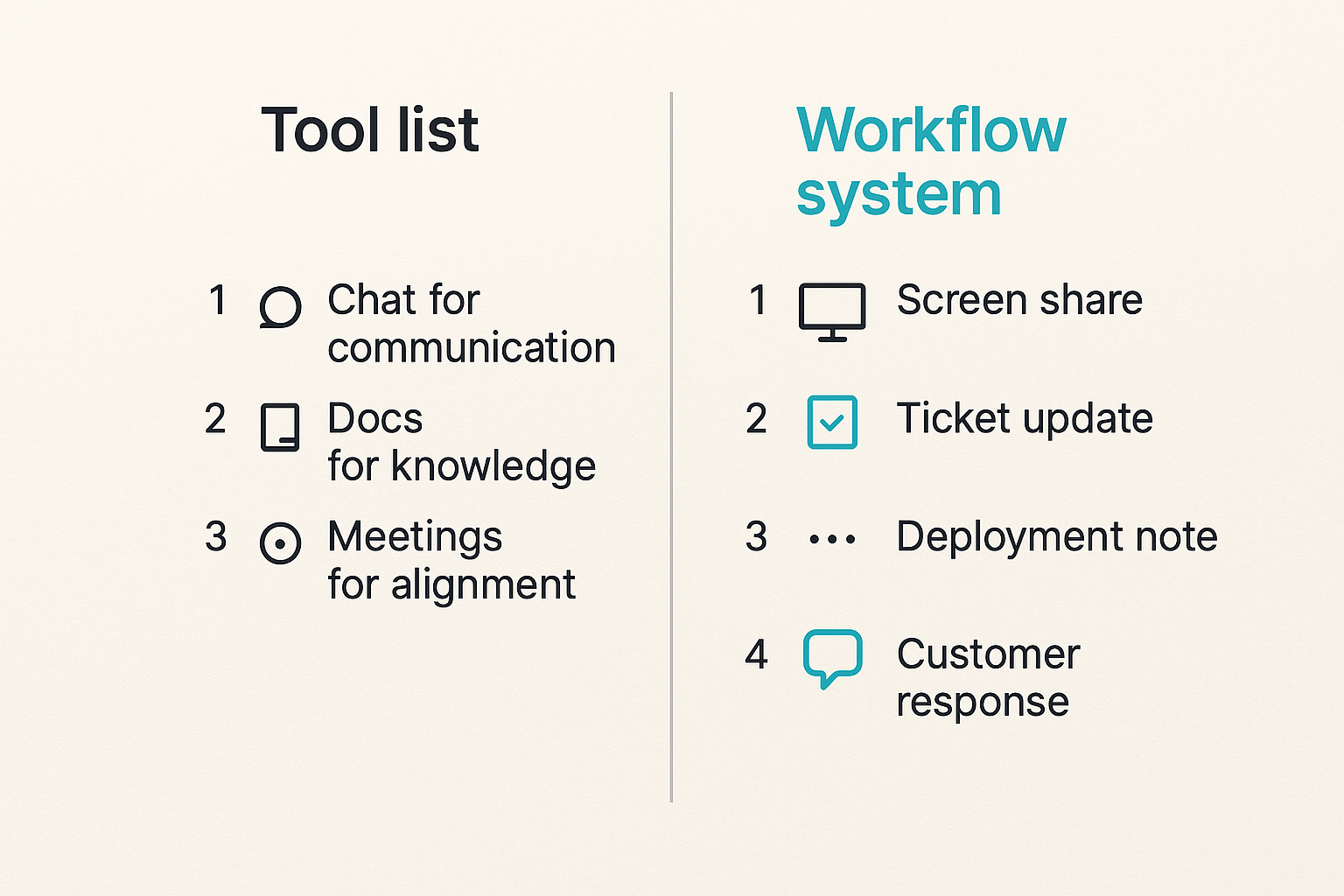
The mistake teams make is assuming each category maps cleanly to a workflow. Chat for communication. Docs for knowledge. Meetings for alignment. Tickets for work. Screen sharing for help. That sounds tidy, but real collaboration crosses those boundaries constantly.
A bug triage session may require a screen share, a log review, remote control, a ticket update, a deployment note, and a customer response. If those tools do not connect through process, the team burns time translating between them.
Related reading from our network: SaaS teams making broader infrastructure choices face the same trap, and this cloud computing software workflow guide frames buying decisions around workflow fit instead of vendor labels.
A better model is workflow ownership
A useful way to think about it is ownership by workflow stage:
| Workflow stage | Bad question | Better question |
|---|---|---|
| Discovery | Which whiteboard is best? | Where does ambiguity become a decision? |
| Execution | Which task tool has more fields? | Who owns the next action and dependency? |
| Live help | Which meeting app is cheapest? | Can the helper see, point, and act safely? |
| Documentation | Where do notes go? | What record will the next person trust? |
| Support | Which inbox do we use? | How does an issue become reproducible work? |
Practical rule: Buy and configure tools around the lifecycle of work, not around software categories.
What changed in 2026
Remote work in 2026 is less about whether teams can work online and more about whether they can work together without operational drag. Teams are distributed by default. Contractors, customers, agencies, and open source contributors move in and out of workflows. AI assistants add another layer of generated summaries, suggested actions, and searchable transcripts.
That makes the architecture problem sharper. If your collaboration system has weak state, AI makes the noise more convincing. If your screen sharing workflow has no permission model, adding more participants increases risk. If your documentation is stale, search becomes a faster way to retrieve wrong answers.
Start with collaboration modes, not vendor names
Before standardizing cloud based productivity and collaboration tools, split work into modes. Different modes need different latency, permissions, and records. Treating all collaboration as chat or meetings is how teams end up with expensive tools and slow execution.
Async work needs state
Async work is not just people working at different times. It is work that must remain understandable without the original conversation. That means state matters.
Good async systems answer:
- What is the current decision?
- Who owns the next step?
- What changed since the last review?
- What evidence supports the decision?
- Where should objections go?
A doc with no owner is not async collaboration. It is a landfill. A ticket with no acceptance criteria is not work management. It is a reminder that somebody had a thought.
Live work needs control
Live collaboration is different. It has higher bandwidth, but it also creates more risk. When two developers debug a local environment, or a product designer walks through a prototype with an engineer, passive observation is often too slow. The person who understands the fix may need to point, select, type, or navigate.
That is where screen sharing with remote control becomes infrastructure, not a convenience. The live session is the shortest path from confusion to shared context when the workflow supports safe participation.
Hybrid work needs handoff rules
Most remote work is hybrid. A conversation starts async, becomes live because the context is messy, then returns to async so the rest of the team can execute. What breaks in practice is the handoff.
A good handoff includes:
- The decision made during the live session.
- The reason that decision was made.
- The owner of the next action.
- Any unresolved risk.
- A link to the artifact that changed.
Practical rule: If a live session changes the work, it must produce an async record before the team moves on.
The core stack remote teams actually need
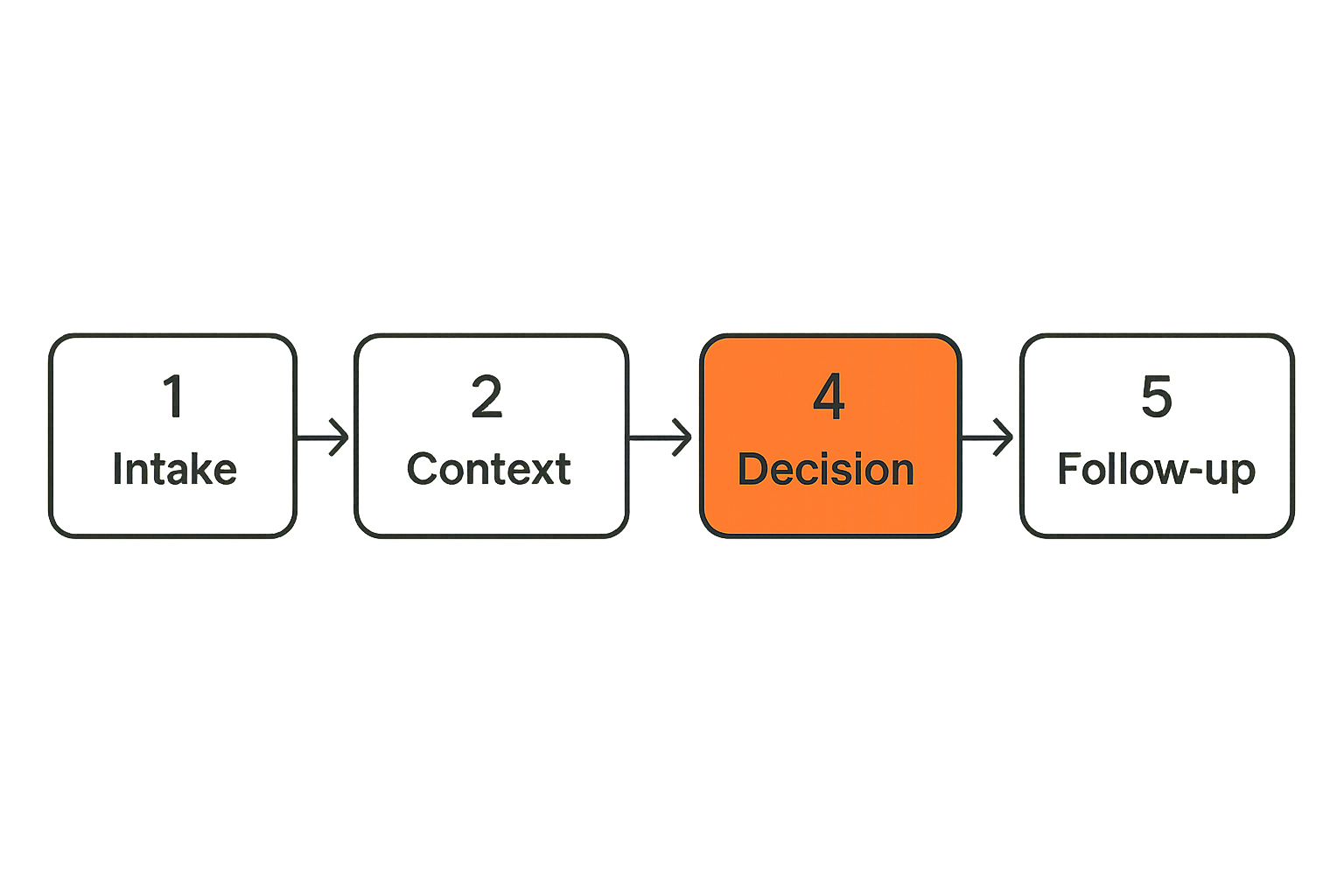
A remote stack does not need to be complicated. It needs to be explicit. Most teams need four systems that work together: record, discussion, shared execution, and support.
This is where many tool audits go sideways. Teams list every app they pay for, then try to reduce cost. Cost matters, but the first question is whether the stack has a reliable place for each kind of work. Our earlier guide on a practical remote collaboration stack covers the broader stack view; here the focus is the operating model behind it.
System of record
The system of record is where durable truth lives. It might be a product brief, issue tracker, customer record, runbook, or design spec. The tool matters less than the rule: if the team needs to rely on it later, it belongs in the system of record.
Do not let chat become the record. Chat is useful for motion, not memory. The same applies to meeting transcripts. A transcript may be evidence, but it is not automatically a decision.
System of discussion
Discussion tools are for negotiation, clarification, and quick coordination. They are intentionally messy. The problem starts when teams ask discussion tools to carry durable state.
Use discussion for:
- Asking who has context.
- Coordinating a live session.
- Raising a blocker.
- Checking whether a decision is still valid.
Do not use discussion as the only place where requirements, approvals, or customer commitments exist.
System of shared execution
Shared execution is where people act together. That includes collaborative editing, pair programming, design review, screen sharing, remote control, and incident response. This layer is often underdesigned because teams assume meetings cover it.
They do not. A meeting lets people talk. Shared execution lets people solve the problem together.
System of support
Support is not only customer support. Internal support matters too: onboarding a teammate, helping a contractor set up a dev environment, walking a PM through a staging bug, or showing a designer why a component behaves differently in production.
If support workflows are ad hoc, senior people become human routers. They answer the same questions repeatedly because the stack does not convert help into reusable context.
Screen sharing and remote control are workflow infrastructure
Cloud based productivity and collaboration tools often treat screen sharing as a meeting feature. That is too narrow. For remote teams, shared screens are where abstract work becomes visible. Remote control is where visible work becomes collaborative.
Why passive screen sharing breaks
Passive screen sharing works when one person is presenting and everyone else is observing. It breaks when the work requires precision.
Common examples:
- A developer watches another developer miss a setting in a local config file.
- A designer describes a spacing issue while the engineer guesses which element is meant.
- A support lead tries to explain a multi-step admin workflow verbally.
- A founder reviews analytics but cannot let an operator test filters directly.
The latency is not only network latency. It is cognitive latency: say the thing, wait for interpretation, correct the interpretation, repeat.
When remote control changes the outcome
Remote control changes the session from explanation to joint action. The helper can demonstrate the fix, not just describe it. The learner can take back control and repeat the step. The team can converge faster because the artifact is shared and interactive.
That does not mean every session should allow control. It means the workflow should support control when the task demands it.
Use remote control for:
- Pair debugging.
- Design implementation reviews.
- Onboarding and setup.
- Internal support.
- Customer walkthroughs where policy allows it.
- Reproducing environment-specific issues.
Guardrails for collaborative control
The operational concern is valid: remote control increases the need for consent, boundaries, and visibility. Treat it as a controlled workflow, not an open door.
Good guardrails include:
- Explicit session consent.
- Clear host control over who can interact.
- Easy pause and revoke behavior.
- Visible cursors or participant indicators.
- No silent background access.
- Team norms around sensitive data.
Practical rule: Remote control should be easy to grant, obvious while active, and faster to revoke than to explain.
Design the workflow before you standardize the tools
Standardization is useful after you know what you are standardizing. If you standardize too early, you lock in the wrong behavior. The team learns to work around the stack, and then the workaround becomes culture.
Map the decision path
Pick one recurring workflow and map it end to end. Do not start with the company-wide tool inventory. Start with a painful path.
For a product bug, the path might look like this:
- Customer reports the issue.
- Support reproduces it.
- Engineering confirms the technical cause.
- Product decides priority.
- Engineering ships the fix.
- Support informs the customer.
- The team updates the known issue record.
Now ask where the work gets stuck. Is it reproduction? Ownership? Context transfer? Environment access? Missing screenshots? Weak logs? Too many meetings?
Define the handoff contract
Every workflow boundary needs a handoff contract. The contract does not need to be bureaucratic. It needs to prevent ambiguity.
A useful handoff contract includes:
- Source artifact: where the work came from.
- Current state: what is known now.
- Decision needed: what the receiver must decide or do.
- Deadline or priority: how urgent it is.
- Evidence: screenshot, recording, log, ticket, branch, design link.
- Owner: the person responsible for the next move.
Related reading from our network: teams thinking about screen sharing as discoverable knowledge may find this piece on screen sharing answer engine optimization useful, especially around transcripts, demos, and structured documentation.
Run the implementation sequence
Do not roll out a collaboration architecture as a giant policy memo. Run it like a product change.
- Choose one high-friction workflow, such as design review, bug triage, onboarding, or customer escalation.
- Identify the system of record, discussion channel, live collaboration method, and support path.
- Define the handoff contract in plain language.
- Configure permissions and templates only for that workflow.
- Run it for two weeks with one team.
- Review failure points and remove unnecessary steps.
- Expand to the next workflow only after the first one is stable.
This sequence keeps the team honest. If the workflow cannot survive real work, adding more tools will not save it.
Security and access are part of productivity
Security is often treated as the department that says no after the productivity stack is already in place. That is backwards. Access design is part of productivity because blocked access creates shadow workflows, and shadow workflows create risk.
Least privilege without blocking work
Least privilege does not mean nobody can do anything. It means people get the minimum access needed for the work they are responsible for, with a path to request more when needed.
For collaboration tools, this usually means:
- Role-based access for core systems.
- Guest access with expiration.
- Separate spaces for customers, contractors, and internal teams.
- Clear ownership for shared folders and boards.
- Review cycles for admin privileges.
If access requests take days, people will export files, share personal links, or move work into unsanctioned tools. The official stack remains clean on paper while the real stack moves elsewhere.
Session boundaries and audit trails
Live collaboration needs session boundaries. Who joined? Who controlled the screen? What system was accessed? Was sensitive customer data visible? Was the session recorded, and if so, where does the recording live?
You do not need heavy compliance machinery for every startup workflow. You do need a clear model for sensitive sessions.
For example:
- Internal pairing on local code may only require consent and visible control.
- Customer support sessions may require stricter identity checks and recording rules.
- Finance, HR, or production admin sessions may require no recording and tighter participant limits.
Vendor sprawl and hidden risk
Every cloud tool adds an identity surface, permission model, data retention policy, and offboarding task. Teams feel the pain only later, usually when someone leaves, a customer asks a security question, or an old link exposes something it should not.
A simple vendor review should ask:
| Risk area | Question to ask | Failure signal |
|---|---|---|
| Identity | Does it support team-managed access? | Personal accounts own critical work |
| Permissions | Can we separate guests from staff? | Contractors see too much |
| Retention | Can we delete or export data? | Old recordings live forever |
| Offboarding | Can access be revoked centrally? | Former users remain active |
| Visibility | Can admins see usage? | Nobody knows who uses the tool |
Related reading from our network: infrastructure-heavy teams face similar placement and trust tradeoffs, and this guide to cloud computing services for decentralized compute builders is a useful adjacent read on architecture boundaries.
Integration is where cloud collaboration tools win or fail
A tool can be good in isolation and still fail the workflow. Integration is not only whether there is an API. It is whether the right event reaches the right person with enough context to act.
Events matter more than exports
Exports are for reporting and backup. Events are for operations.
Useful events include:
- A live session started for a ticket.
- A recording was attached to a bug.
- A remote control session was granted or revoked.
- A design review changed status.
- A support escalation moved to engineering.
- A document was approved.
If events do not exist, the team relies on manual updates. Manual updates work until the team is busy, which is exactly when they matter most.
Notifications need routing, not volume
More notifications do not create better collaboration. They create numbness. The right model is routing.
Route notifications by:
- Ownership: notify the person who can act.
- Severity: distinguish FYI from blocker.
- Workflow stage: notify differently for review, approval, and escalation.
- Channel: keep urgent work out of low-signal rooms.
- Quiet hours: respect time zones unless the issue is truly urgent.
Practical rule: A notification without a clear owner and expected action is collaboration debt.
Documentation should be generated from work
Documentation fails when it is a separate chore. The best documentation is captured as a byproduct of execution: session notes, decision summaries, linked recordings, annotated screenshots, ticket updates, and changed runbooks.
This does not mean every conversation must be recorded. It means the stack should make it easy to convert important collaboration into durable context.
For PairUX-specific setup and operating guidance, teams can use the PairUX documentation when they are defining install steps, system requirements, and security expectations for shared screen workflows.
Metrics that show whether collaboration is working
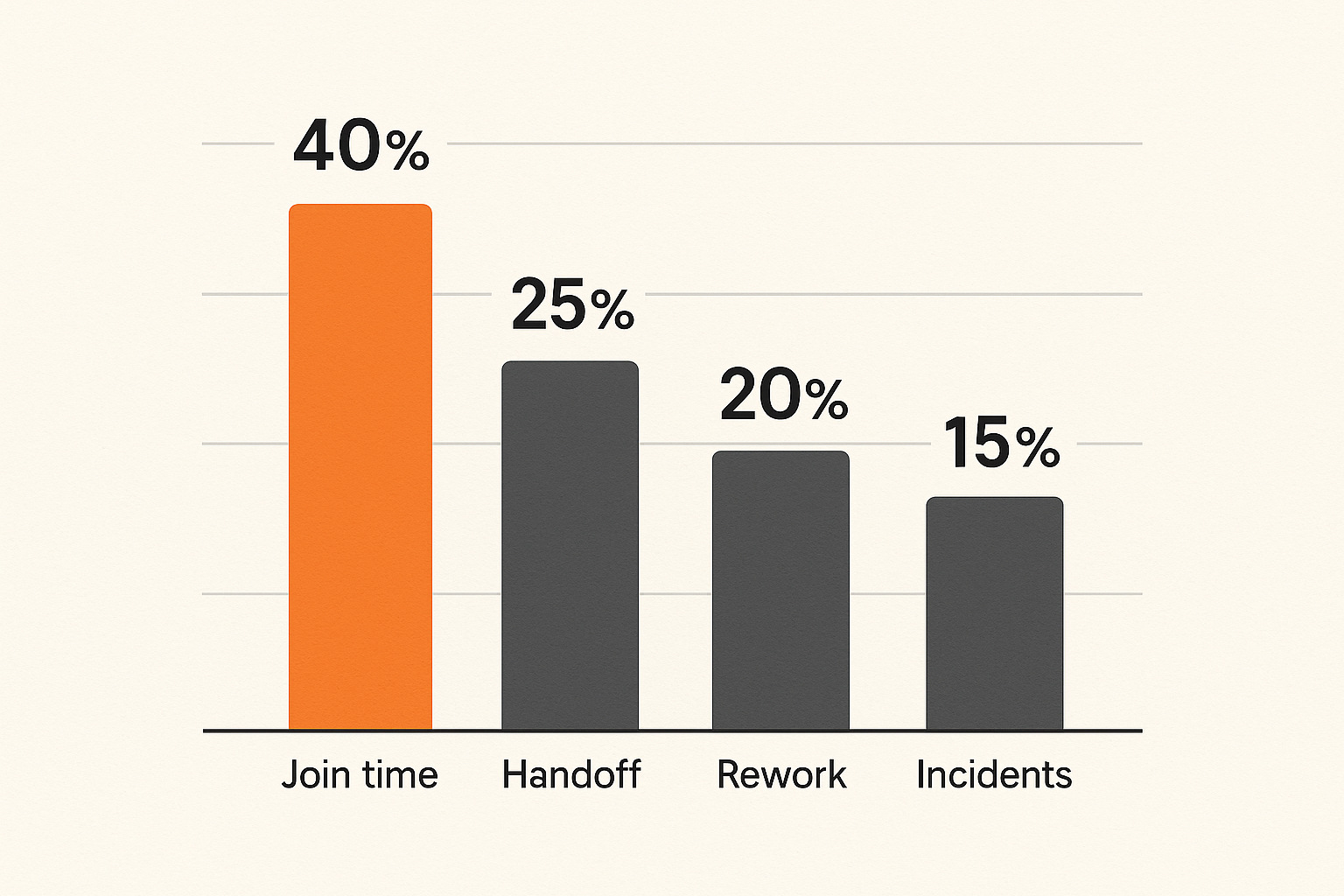
You cannot improve collaboration by counting messages. A busy Slack channel does not prove alignment. A full calendar does not prove progress. The useful metrics focus on friction, handoffs, rework, and unblock time.
Measure time to shared context
Time to shared context is how long it takes for the right people to understand the same problem well enough to act. This is often where remote teams leak hours.
Signals include:
- Time from question to first useful response.
- Time from bug report to reproducible case.
- Time from design comment to implementation decision.
- Time from onboarding blocker to successful setup.
If this metric is high, the issue may not be staffing. It may be that context is scattered across too many systems.
Measure handoff quality
A handoff is good when the receiver can act without reconstructing the entire conversation. Track handoff quality through lightweight review.
Ask after important workflow transfers:
- Did the receiver know what to do next?
- Was the evidence sufficient?
- Was the priority clear?
- Was the owner clear?
- Did the receiver need another meeting to understand it?
If every handoff creates another meeting, the collaboration system is not preserving state.
Measure avoidable rework
Rework is not always bad. Product teams learn by revising. Avoidable rework is different. It happens because decisions were unclear, requirements were hidden, feedback arrived late, or nobody shared the actual user constraint.
Track examples, not just counts. A monthly review of five painful rework cases will teach you more than a dashboard full of weak metrics.
A practical metric table might look like this:
| Metric | What it reveals | Bad pattern |
|---|---|---|
| Time to shared context | Context discovery friction | People ask the same question repeatedly |
| Handoff rejection rate | Poor transfer quality | Work returns to sender incomplete |
| Reopened decisions | Weak decision records | Old debates restart |
| Setup unblock time | Onboarding friction | New hires wait on senior people |
| Session-to-record ratio | Live work capture | Calls happen but no record changes |
Common failure modes in cloud based productivity and collaboration tools
Most collaboration failures are predictable. The tools are rarely unusable. The operating model is usually underdefined.
What works
What works is boring and explicit:
- One primary place for durable decisions.
- Clear rules for when chat becomes a ticket or document.
- Live collaboration for ambiguous or high-bandwidth work.
- Remote control only with visible consent and easy revocation.
- Templates that reduce ambiguity instead of adding ceremony.
- Lightweight reviews of handoffs and rework.
- Offboarding and guest access rules that people actually follow.
The point is not to make every workflow rigid. The point is to remove unnecessary interpretation.
What fails
What fails is also predictable:
- Tool sprawl with no ownership.
- Meeting recordings that nobody watches.
- Chat threads treated as approvals.
- Screen shares with no follow-up record.
- Guest links that never expire.
- Notifications sent to rooms where nobody owns the action.
- AI summaries trusted without a system of record.
- Remote control used without consent norms.
The worst version is when every team builds its own mini-stack. Product has one process, engineering has another, support has another, and leadership sees only status updates. The organization looks aligned in meetings but fragments during execution.
The operating review
Run a monthly operating review for collaboration. Keep it practical. Do not turn it into a governance theater.
Review:
- The top three workflows that caused delay.
- The most common handoff failures.
- Tools with low usage but high cost or risk.
- Access exceptions and guest accounts.
- Rework caused by missing context.
- Live sessions that should have created records but did not.
- One workflow improvement to test next month.
This review gives the stack an owner. Without it, the stack decays quietly.
Where PairUX fits in the collaboration architecture
PairUX is not trying to replace your docs, chat, issue tracker, or design tool. Its job is narrower and more useful: help remote teammates share screens, collaborate with remote control, and work through high-context problems together.
That matters because cloud based productivity and collaboration tools are only as strong as the moments where people get unstuck. A beautiful async process still needs a fast path for shared execution.
Use it for moments where shared control matters
PairUX fits best when the blocker is visual, interactive, or hard to explain in text. Examples include:
- A developer helping another developer configure a local environment.
- A designer and engineer reviewing implementation details together.
- A founder walking an operator through a dashboard workflow.
- A support teammate reproducing an issue with a colleague.
- A product manager validating a confusing user path.
The PairUX features page is the right place to evaluate capabilities such as real-time screen sharing, remote control, multi-cursor collaboration, and cross-platform support against your own workflow requirements.
Pair it with your existing stack
The right way to use a shared screen tool is to pair it with the rest of the workflow:
- Start from a ticket, doc, design, or support case.
- Use PairUX for the live collaboration moment.
- Capture the decision or fix in the system of record.
- Link the changed artifact back to the original work.
- Close the loop with the person or team that was blocked.
That is the architecture pattern. PairUX handles the shared execution layer. Your existing tools handle durable state, discussion, planning, and reporting.
Try pairux.com
PairUX is for remote teams that need fast, practical guidance on collaborative screen sharing, remote control, and working together online. If your cloud based productivity and collaboration tools still leave people stuck in calls, try adding a better shared execution layer.