2026-06-04
Cloud Based Productivity and Collaboration Tools: A Practical Architecture for Remote Teams

Remote teams do not usually fail because they picked the wrong note app. They fail because work gets split across too many surfaces, decisions happen in the wrong channel, and nobody can reconstruct what changed after the meeting ends.
Cloud based productivity and collaboration tools are supposed to fix that. In practice, many teams add another workspace, another permission model, another notification stream, and another place where context goes to die.
Teams think the problem is tool selection. The real problem is collaboration architecture: where work starts, where it is discussed, where it is changed, where it is approved, and how people get help when they are stuck.
That changes the conversation. The practical question is not which cloud tool has the longest feature checklist. It is whether your stack helps remote designers, developers, operators, and founders move from signal to decision to execution without losing trust or context.
Table of contents
- Why cloud based productivity and collaboration tools are an architecture problem
- Map the collaboration system before buying tools
- Core categories of cloud based productivity and collaboration tools
- Workflow design for product, design, and engineering
- The screen sharing and remote control layer
- Integration, identity, and security boundaries
- Operational metrics that actually matter
- Implementation sequence for a remote collaboration stack
- Common failure modes in cloud collaboration
- Where PairUX fits in the collaboration architecture
Why cloud based productivity and collaboration tools are an architecture problem
The stack is not the system
The mistake teams make is treating cloud based productivity and collaboration tools as a shopping category. They compare chat, docs, whiteboards, project trackers, video calls, screen sharing, and AI assistants as if the winner is the tool with the most features.
But a remote team is not a feature comparison table. It is a set of workflows under pressure. A designer needs a developer to inspect a prototype. A founder needs a product decision captured before the next sprint. A support issue needs a reproduction path. A new hire needs help without waiting a full day for async clarification.
The stack is only useful if the work has a clear route through it.
Practical rule: If your team cannot explain where a decision starts, where it is discussed, where it is finalized, and where it is executed, adding another cloud tool will usually make the system worse.
A useful way to think about it is this: cloud tools provide surfaces. Your operating model provides the rails. Without rails, every surface becomes a side channel.
The real cost is coordination drag
Coordination drag is not just wasted time. It is the compounding cost of repeated context reconstruction.
Someone asks for feedback in chat. A designer answers in a file comment. A developer follows up in a ticket. The founder changes priority in a call. Two days later, nobody knows which version is current.
That is not a communication problem in the soft sense. It is an architecture problem. The source of truth is unclear, the handoff points are undefined, and the tool boundaries are leaking.
Here is the practical comparison:
| Approach | What it optimizes | What breaks in practice |
|---|---|---|
| Tool-first stack | Fast adoption of popular apps | Duplicate context, unclear ownership, notification noise |
| Meeting-first stack | Quick live alignment | Decisions vanish, async teammates miss context |
| Document-first stack | Durable knowledge | Slow feedback loops, weak interactive support |
| Workflow-first stack | Clear movement from signal to action | Requires discipline and explicit defaults |
The workflow-first approach is not glamorous, but it is what scales.
The operating question
The operating question is simple: what should happen when a teammate gets blocked?
If the answer is maybe they post in chat, maybe they schedule a call, maybe they comment in a doc, maybe they wait, your collaboration system is fragile. Remote work amplifies ambiguity. Time zones, deep work blocks, and tool fatigue make weak defaults expensive.
Cloud based productivity and collaboration tools should reduce the number of judgment calls required to collaborate. They should make the next step obvious.
Map the collaboration system before buying tools
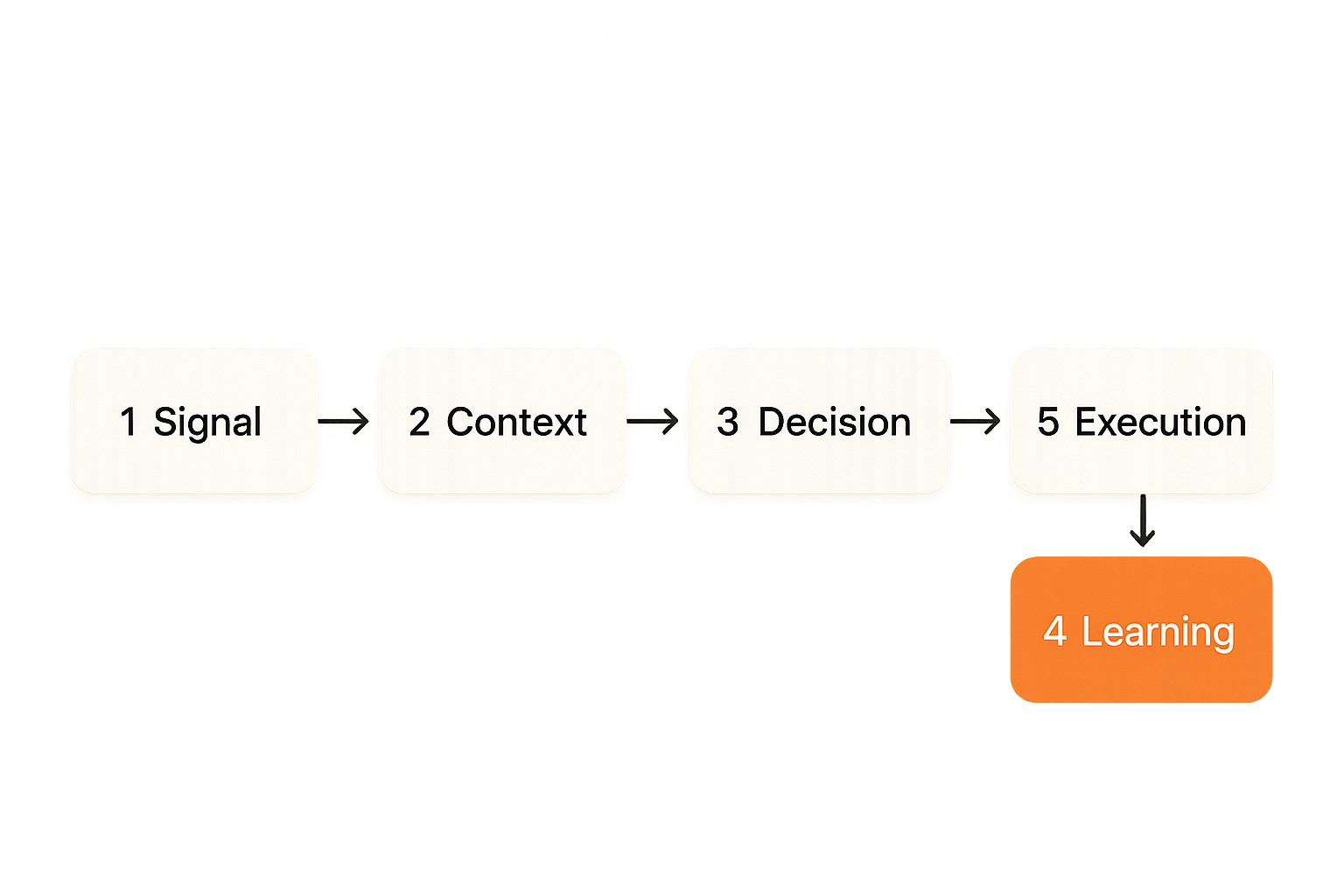
Start with work states
Before you evaluate software, map the states your work moves through. Most remote product teams have a version of this flow:
- Signal appears: customer request, bug, idea, metric shift, founder instinct.
- Context is gathered: screenshots, logs, research, examples, constraints.
- Decision is made: prioritize, defer, reject, split, assign.
- Work is produced: design, code, copy, operations task.
- Review happens: async comments, live walkthrough, test session.
- Change ships: release, handoff, announcement, support update.
- Learning is captured: what changed, what worked, what broke.
The tool stack should support those states. If it only supports communication, you get chatter. If it only supports artifacts, you get slow cycles. If it only supports project tracking, you get clean boards attached to messy reality.
Related reading from our network: teams evaluating AI content SaaS as a workflow system face a similar problem: the value is not the editor, it is how briefs, approvals, governance, and measurement connect.
Assign one place for each state
Every state needs a default home. Not a perfect home. A default home.
For example:
- Customer signal: support inbox or issue tracker.
- Product decision: product brief or decision log.
- Design exploration: design file.
- Live debugging: shared screen session.
- Implementation work: ticket and code repository.
- Release note: changelog or release document.
The point is not to eliminate movement between tools. The point is to make movement intentional.
Practical rule: A tool boundary should exist because the work changed state, not because someone had a personal preference for another app.
This is where many remote teams lose control. They let every person pick their own path. That feels flexible for a month. Then onboarding slows down, reviews become inconsistent, and leadership cannot see what is actually happening.
Document the handoffs
Handoffs are where collaboration systems fail. A meeting ends but no ticket is updated. A prototype is approved but the acceptance criteria stay vague. A developer fixes a bug but support never hears about the customer-facing change.
Write the handoff rules in plain language:
- After a live review, the owner posts the decision in the ticket.
- After a remote control support session, the helper adds reproduction steps.
- After a design critique, unresolved questions are converted into assigned tasks.
- After a release, the change is logged for customer-facing teams.
This does not need a committee. It needs defaults that people can follow when they are tired.
Core categories of cloud based productivity and collaboration tools
Communication tools
Communication tools include chat, email, video calls, voice rooms, and comments. They are good at creating attention. They are not always good at preserving decisions.
Use communication tools for:
- Requests for attention.
- Short clarifications.
- Live discussion.
- Escalation.
- Social presence.
Do not use them as the only source of truth for product scope, technical decisions, or customer commitments. Chat history is searchable in theory. In production, people rarely reconstruct complex decisions from chat threads unless something has already gone wrong.
The mistake teams make is believing search equals memory. Search helps when you know what to search for. A decision log helps when you do not.
Artifact tools
Artifact tools include documents, design files, code repositories, spreadsheets, diagrams, recordings, and knowledge bases. They are where work becomes inspectable.
Good artifact tools provide version history, comments, permissions, ownership, and export paths. Bad artifact usage creates a junk drawer: final-final-v3, stale specs, unowned dashboards, and links that require access nobody has.
What works:
- One owner per artifact.
- Clear status labels such as draft, review, approved, archived.
- Links from tickets to the artifact of record.
- Short summaries at the top of long documents.
What fails:
- Using comments as task management.
- Keeping decisions only in meeting recordings.
- Treating design files as product specs without context.
- Letting old documents remain active by accident.
Execution tools
Execution tools include task boards, issue trackers, sprint tools, roadmaps, code review queues, deployment systems, and incident trackers. They coordinate commitments.
The practical question is whether execution tools reflect the real work or just a sanitized version of it. A board that looks clean while the team coordinates in private messages is not an operating system. It is theater.
Execution tools should answer:
- Who owns this?
- What is the current state?
- What decision is blocking it?
- Where is the supporting context?
- What happens next?
For startup operators, this matters because leadership often reads the execution layer as reality. If reality lives elsewhere, planning becomes guesswork.
Interactive tools
Interactive tools include screen sharing, remote control, collaborative browsers, multiplayer whiteboards, pair programming sessions, and live product walkthroughs. They handle the work that cannot be explained efficiently through static artifacts.
This is especially important for product designers and developers. A bug reproduction, layout issue, onboarding confusion, or design nuance can take twenty messages to explain and two minutes to show.
Interactive tools should not replace artifacts. They should accelerate understanding and then push the result back into the durable system.
For teams comparing live collaboration options, the PairUX feature overview is useful because it frames screen sharing, remote control, multi-cursor collaboration, and cross-platform support as workflow capabilities rather than meeting decorations.
Workflow design for product, design, and engineering
Product decisions need durable context
Product work creates ambiguity by default. There are customer requests, founder instincts, technical constraints, design tradeoffs, and market timing. Cloud based productivity and collaboration tools can help, but only if decisions are captured where future work can find them.
A lightweight product decision record can be enough:
Decision: Keep onboarding step 2 optional
Owner: Product
Date: 2026-06-04
Context: Activation analysis and support feedback show confusion around required setup
Options considered: require setup, skip setup, make optional
Decision: make optional with reminder later
Follow-up: design empty state, update docs, track completion rate
This is not bureaucracy. It is a compression format for future teammates.
Related reading from our network: product management for founders makes the same operator point from a prioritization angle: signals only matter when they become decisions, launches, and learning loops.
Design reviews need live manipulation
Design reviews often fail because the reviewer can only point and talk. They cannot manipulate the prototype, inspect the responsive state, test the empty state, or reproduce the interaction problem directly.
A better design review flow looks like this:
- Designer shares the artifact and decision context before the session.
- Reviewer joins with a specific question or risk area.
- Team uses live screen sharing or remote control to inspect the actual experience.
- Owner captures decisions and unresolved questions in the design task.
- Follow-up work is assigned before the session ends.
The difference is subtle but important. The meeting is not the product of the review. The updated artifact and decision trail are.
Engineering collaboration needs shared state
Developers do not just need to talk. They need shared state: the same branch, reproduction steps, logs, terminal output, browser state, local environment constraints, and deployment context.
That is why engineering collaboration breaks when the tool stack only supports conversation. A developer can describe a failing test. But if another teammate can see the environment, control the session with permission, and inspect the issue directly, the loop gets shorter.
This does not mean every problem needs a live session. Async is still the default for deep work. But when a problem has high ambiguity and low documentation value, live collaboration is often cheaper than another thread.
The screen sharing and remote control layer
Why viewing is not collaboration
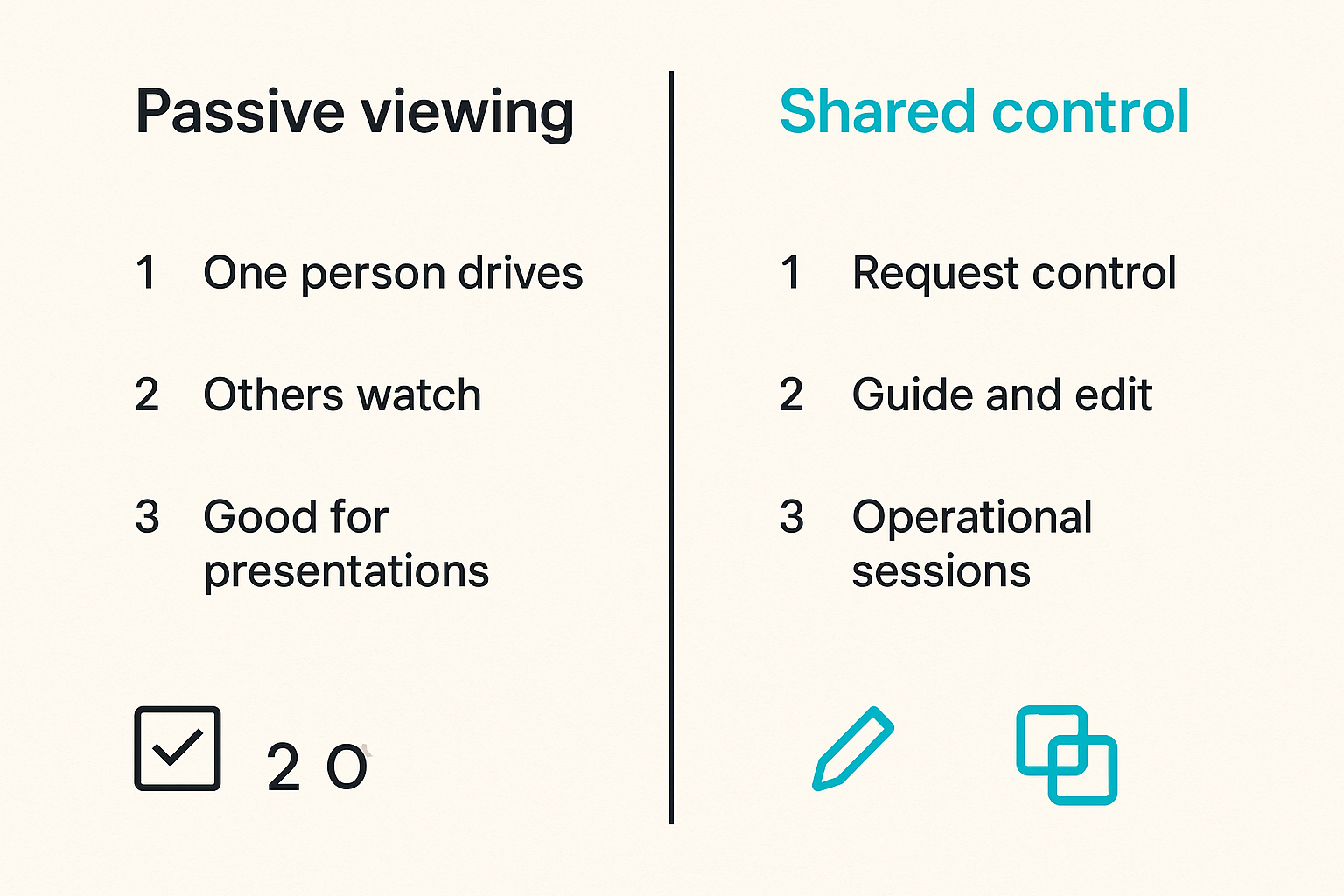
Basic screen sharing is passive. One person drives, everyone else narrates. That is fine for demos, status updates, and presentations. It is weaker for joint problem solving.
Collaborative screen sharing changes the shape of the session. When teammates can point, guide, or request control, the session becomes operational. The person with context does not have to translate every action into verbal instructions.
What breaks in practice is control ambiguity. Who is driving? Who can click? What is visible? Can control be revoked quickly? Is the session scoped to the right window or the entire desktop? These details decide whether the tool feels safe enough for real work.
Practical rule: Use passive screen sharing for broadcasting information. Use collaborative screen sharing and remote control when the task requires shared manipulation, inspection, or guided execution.
When remote control changes the workflow
Remote control is not just a convenience feature. It changes who can unblock the work.
Examples:
- A developer helps a designer inspect a local build without requiring a full setup.
- A product manager walks through a confusing admin flow with an engineer watching state changes.
- A teammate fixes a configuration issue while the owner observes and learns.
- A founder reviews a prototype and directly tests edge cases instead of describing them vaguely.
The value is not that someone else can click your screen. The value is that the team can move from explanation to shared execution.
This is also where security and etiquette matter. Remote control should be explicit, revocable, and scoped. Teams should normalize asking before taking control and narrating changes while driving.
What fails with weak session design
Weak session design creates risk and frustration:
- People share more of their screen than intended.
- Control handoff is unclear.
- Observers talk over the driver.
- Nobody captures the outcome.
- The session solves the immediate problem but leaves no trace.
The last point is the common one. A great live collaboration session can still create operational debt if the decision or fix never reaches the ticket, document, or code review.
The session is a bridge. It is not the archive.
Integration, identity, and security boundaries
Identity should follow the team model
Cloud based productivity and collaboration tools introduce identity decisions. Who can access what? Are contractors separate from employees? Can guests join sessions? Are permissions tied to projects, teams, or individual links?
The mistake teams make is treating identity as an admin chore. It is part of the collaboration design.
A small startup can sometimes survive with simple access rules. As soon as you add customers, contractors, agencies, or sensitive product work, loose permissions become a drag. People either over-share because it is easy or under-share because access requests are painful.
Good identity design makes the safe path the easy path.
Permissions should match collaboration risk
Not every collaboration surface has the same risk.
A public roadmap document, an internal incident review, a customer data dashboard, and a remote control session should not have identical permission assumptions. The permission model should match the action the tool enables.
Use this rough risk ladder:
| Collaboration action | Risk level | Permission requirement |
|---|---|---|
| View public artifact | Low | Link or public access |
| Comment on internal doc | Medium | Authenticated team access |
| Edit product spec | Medium-high | Project role or owner approval |
| Control shared screen | High | Explicit session permission and visible consent |
| Access production data | Very high | Strong identity, audit trail, least privilege |
Security does not have to block collaboration. It should make sensitive actions explicit.
Security reviews should include workflows
A security review that only asks whether a vendor encrypts data misses how the team actually works. The practical review should include workflows:
- What data appears during screen sharing?
- Can guests join sessions?
- Can control be granted accidentally?
- Are recordings created? Where do they live?
- Who can see shared links after the project ends?
- What is the offboarding process?
For implementation details, teams can use the PairUX documentation to check installation, system requirements, security notes, and frequently asked questions before rolling the tool into a broader collaboration stack.
Related reading from our network: software teams thinking about collaboration security may also find this piece on security service architecture for CI/CD and supply chain defense useful because it treats security as enforcement inside the workflow, not as a separate checklist.
Operational metrics that actually matter
Measure handoff latency
Most productivity dashboards measure activity. Messages sent. Meetings held. Tasks closed. Documents created.
Those numbers can be useful, but they rarely expose the collaboration bottleneck. Handoff latency is often better: how long does it take for work to move from one responsible person or state to the next?
Examples:
- Time from bug report to reproduction.
- Time from design ready to engineering clarification complete.
- Time from decision meeting to ticket update.
- Time from implementation complete to release note published.
If handoff latency is high, the team may not need more output. It may need cleaner ownership and better collaboration defaults.
Measure recovery time
Recovery time is how long it takes a teammate to regain context after being away.
Remote teams should care about this because async work assumes people can re-enter the stream without live narration. If a developer returns from two days of deep work and needs four people to explain what changed, your system is leaking context.
You can test recovery time manually. Pick a shipped change. Ask someone who was not involved to answer:
- Why did we do this?
- Who decided it?
- What alternatives were rejected?
- What changed during review?
- Where is the final artifact?
If they cannot answer from the system, the system did not capture enough context.
Measure context completeness
Context completeness is not a perfect metric, but it is a useful review habit. For important work, ask whether the artifact includes the core pieces:
- Problem statement.
- Owner.
- Current status.
- Decision or open question.
- Links to supporting artifacts.
- Next action.
This is where cloud based productivity and collaboration tools should earn their keep. They should make complete context easier to create than scattered context.
Implementation sequence for a remote collaboration stack
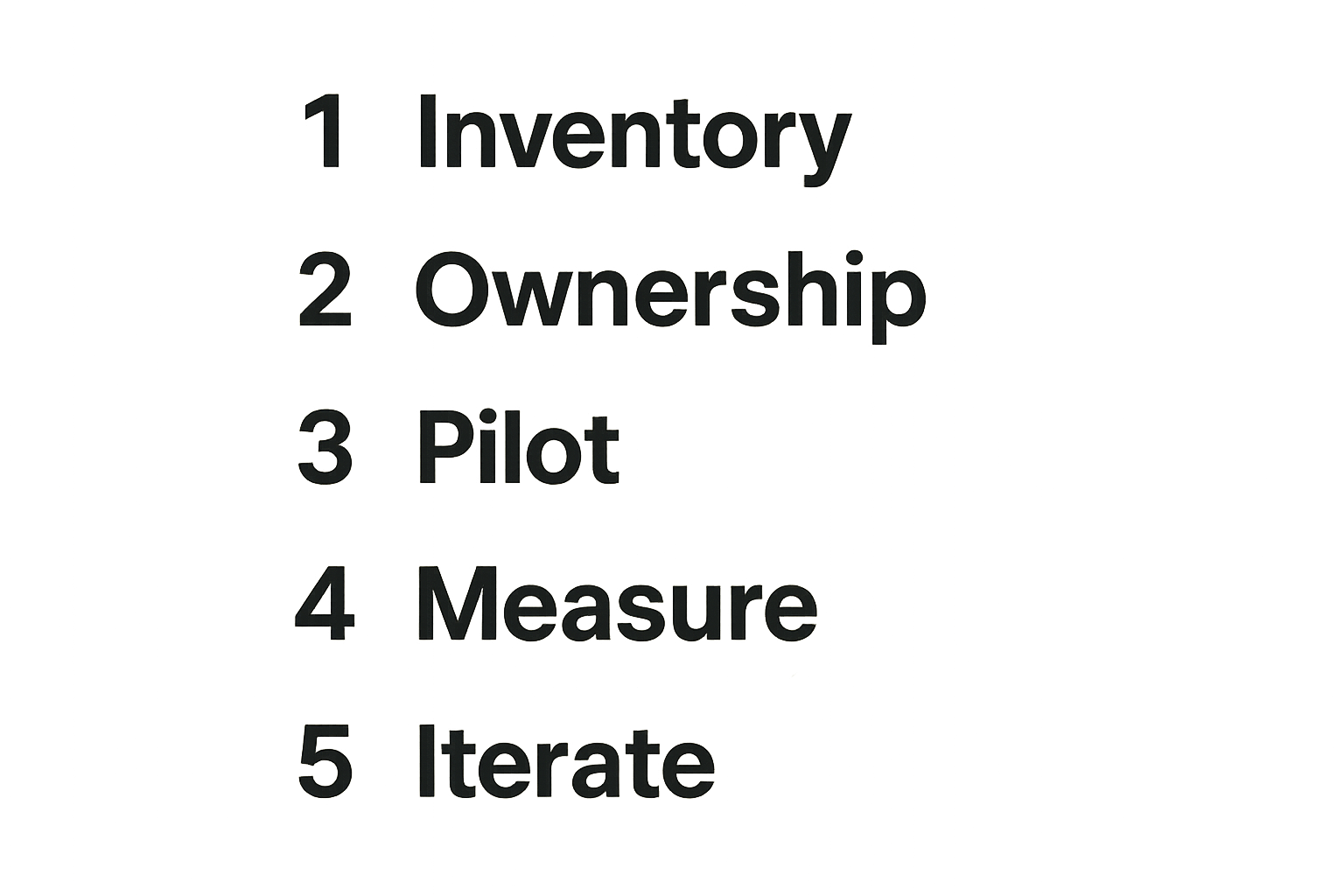
Step 1: Inventory the current stack
Start by listing the tools people actually use, not the tools leadership thinks they use.
Include:
- Chat and direct messages.
- Docs and knowledge bases.
- Design tools.
- Code and review systems.
- Project trackers.
- Video and screen sharing tools.
- Customer support systems.
- Automation and notification tools.
Then map each tool to the work state it supports. If a tool does not have a clear state, it may be redundant. If a state has five tools, it probably has unclear ownership.
A simple inventory format works:
Tool: Chat
Primary state: attention and quick clarification
Source of truth: no
Owner: operations
Retention concern: medium
Common failure: decisions buried in threads
Do not turn this into a six-week audit. A focused two-hour workshop can reveal most of the problems.
Step 2: Define ownership and defaults
Ownership means someone is responsible for the rule, not that they approve every action.
Define defaults like:
- Product decisions live in the product brief or decision log.
- Work commitments live in the project tracker.
- Design source of truth lives in the design file, with summary links in tickets.
- Live debugging sessions end with reproduction steps or a fix note.
- Remote control is explicit, temporary, and narrated.
- Release-facing changes are posted to the changelog or release document.
The PairUX changelog is a practical example of why release history matters: remote teams need a place to see what changed without piecing together updates from chat or calls.
Step 3: Pilot on one real workflow
Do not redesign collaboration for the whole company at once. Pick one workflow with real pain.
Good pilots include:
- Design-to-engineering handoff.
- Bug reproduction and triage.
- New feature review.
- Customer support escalation.
- Remote onboarding.
Run the pilot for two or three cycles. Track the actual points of friction. Did people know where to start? Did they capture the outcome? Did the live session reduce ambiguity? Did the ticket reflect reality after the session?
At the end, keep the rules that reduced friction and delete the ones that people worked around. Collaboration architecture has to survive contact with daily work.
Common failure modes in cloud collaboration
Tool sprawl disguised as flexibility
Tool sprawl usually starts with good intent. One team likes a different whiteboard. Another team adds a second doc system. A founder starts using a lightweight task app. A contractor prefers a different screen sharing tool.
Individually, each choice is reasonable. Collectively, the system becomes expensive.
Symptoms include:
- New hires ask where things live and get different answers.
- Teams duplicate documents because access is unclear.
- Leaders ask for status in meetings because boards are not trusted.
- Decisions are made in whichever tool had attention that day.
What works is not banning every new tool. What works is requiring a clear workflow reason for adding one.
Practical rule: New collaboration tools should replace a workflow, improve a handoff, or create a capability the team does not already have. If they only add another place to talk, be skeptical.
Meetings without artifacts
Meetings feel productive because people are present. But a meeting without an artifact is often just temporary alignment.
The fix is simple: every important meeting needs an output type before it starts.
Examples:
- Decision meeting: decision record.
- Design review: approved changes and open questions.
- Debugging session: reproduction steps or fix summary.
- Planning session: prioritized commitments.
- Customer review: insights and follow-up owners.
If nobody knows the output type, the meeting probably needs a clearer purpose.
Automation without ownership
Automation can make cloud based productivity and collaboration tools much better. It can sync statuses, create tasks, post reminders, update release notes, and reduce manual handoffs.
It can also spread bad process faster.
Automation fails when:
- Nobody owns failed syncs.
- Notifications go to channels nobody reads.
- Automated tasks lack context.
- Status changes imply work is done when it is not.
- Integrations break silently after permission changes.
Automation should support ownership, not replace it. If a human cannot explain the workflow, an automation will not save it.
Where PairUX fits in the collaboration architecture
What PairUX should own
PairUX fits the interactive layer: collaborative screen sharing, remote control, multi-cursor collaboration, and live help between teammates. It is most useful when the work is visual, stateful, or hard to explain asynchronously.
That includes:
- Pairing on a UI issue.
- Walking through a product flow.
- Helping a teammate configure an environment.
- Reviewing a prototype interactively.
- Debugging a user-facing issue with shared context.
In a healthy stack, PairUX does not need to become the source of truth. It should shorten the time between confusion and shared understanding, then push the outcome back into the artifact or task system.
What PairUX should not own
PairUX should not replace your project tracker, product brief, release notes, or long-term knowledge base. Live collaboration is powerful because it is immediate. That is also why it needs a durable follow-up path.
The mistake teams make is treating the session as the work record. The session is where understanding happens. The ticket, document, code review, or changelog is where the organization remembers.
A strong PairUX workflow looks like this:
- Start from a specific task, bug, prototype, or question.
- Join a collaborative screen sharing session.
- Grant control only when the task requires it.
- Solve, inspect, or reproduce the issue together.
- Capture the result in the source-of-truth tool.
- Close the loop with the owner.
That is the architecture: live interaction connected to durable execution.
A practical product fit checklist
PairUX is likely a good fit if your remote team regularly says things like:
- Can you just show me what you mean?
- I need to see your screen to understand the bug.
- Let me drive for a second.
- This would be faster if we paired live.
- The design comment thread is getting too abstract.
- New teammates get stuck on setup and need guided help.
It is probably not the first problem to solve if your team has no project ownership, no decision records, and no agreement on where work lives. Fix those defaults too. The best interactive tool still needs a workflow around it.
Cloud based productivity and collaboration tools work when each layer has a job: communication creates attention, artifacts preserve context, execution tools coordinate commitments, and interactive tools help people solve ambiguous problems together.
Try pairux.com
pairux.com gives remote teams fast, practical collaborative screen sharing and remote control for working together online. If your cloud based productivity and collaboration tools need a stronger live collaboration layer, Try pairux.com.